
Hexzzle playing help
Get unstuck, keep playing
Find the part that feels confusing, then get back to your board.
A piece will not fit
A red preview means at least one tile cannot land on an empty cell. A matching stack is not a place you can put another tile on top of.
- Check every tile in the piece, including the ones near the edge of the board.
- Keep the orientation shown in the tray. Pieces cannot be rotated by hand.
- After an invalid attempt, select the tray piece again. The failed move clears your selection; it does not use the piece.
You can tap a tray piece, then tap the board instead of dragging. If the game ends while some cells are still empty, none of the remaining pieces fits those spaces in its current shape.
Compare a blocked duo with a legal move.
Matching colors stay apart
Same-color tiles need a path of touching hex neighbors. They do not gather across an empty space or another color. A mixed piece resolves each color separately.
The + is a gather point for a repeated color in the piece, not an extra token. Below 6, one stack remains and the source cells empty. At 6 or more, the gathered stack Blooms too.
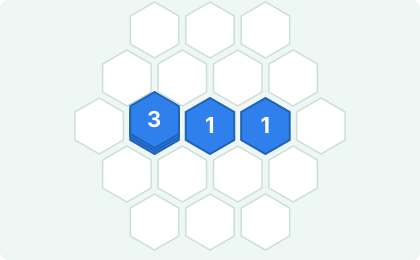
Here, 3 + 1 + 1 = 5. Three occupied cells represent five tokens. It is the token total that needs to reach 6. This merge still opens space even though the Bloom counter does not increase.
See where the + gathers a mixed piece or try making room before 6.
Undo, restart and leaving a round
Undo restores the board, tray and score from before your most recent successful placement. It is a one-move undo, not a full history. After using it, another undo becomes available after a new successful placement.
Restart and Play Again start a fresh board immediately. They do not clear your saved local records. Restarting an unfinished round does not add that round to Records.
Classic saves after each completed move in this browser. On your next visit, choose Continue game to restore the board, tray, score and last Undo. Selection and drag previews are not restored. Time away is not added to the saved play duration. An unfinished round is separate from completed results in Records.
New game replaces the unfinished round, but keeps completed local records. If a game update makes a save incompatible, Hexzzle explains why it cannot continue that round. A damaged save is not loaded into the board.
If a save warning appears, keep the game tab open: the latest move may not be saved, and an older save may still exist. Browser storage restrictions or clearing site data can remove access to a saved round. Use one game tab at a time; an older tab will not overwrite a newer tab’s save. There is no device sync or server backup.
Help still opens in a separate tab from the game. Switch back to your original tab to continue without reloading.
Reading your Bloom Result
| Label | What it counts |
|---|---|
| Score | Points from placements, stack progress and Blooms, including any bonuses. |
| Best | The best score for this browser, including the round just completed. |
| Blooms | Stacks that reached 6 or more and cleared. Two colors clearing in one move count as two Blooms. |
| Best Stack / Stack | The largest stack total reached during the round, including a stack that Blooms. |
| Overblooms / Over | The number of Blooms above 6, not the number of extra tokens. |
| Pieces | Successfully placed tray pieces, not individual hex tiles. |
For example, a blue duo joining a blue 5 reaches 7. That gives one Bloom, one Overbloom, and one piece placed. Best Stack is at least 7. A stack of 8 is also one Overbloom, with a larger overflow bonus.
A below-6 gather can increase Score without increasing Blooms. There is no contradiction: stack progress earns points too.
Compare one mixed piece making two Blooms.
Finding your local records
At game over, choose Records in Bloom Result. It opens the local list; Hide Records closes it. Only the top 10 completed Classic scores are kept, so a lower result may not appear in that list.
Records are sorted by score, then Blooms, Best Stack, Overblooms, and finally the earlier result when all those values tie. They are not a public ranking.
If a saved result seems missing:
- Open hexzzle.com in the same browser on the same device you played on. Another browser or a preview/test address has its own storage.
- Check that the round reached Bloom Result. An unfinished board is not a saved record.
- Remember the list keeps only the top 10. A finished round does not always replace an entry.
Do not clear site data to recover a score. That can remove local records and preferences. Hexzzle has no account sync or server copy that can restore deleted local records.
Sound and touch controls
Sound starts off unless you previously enabled it in this browser. Use the music-note button below the tray to turn it on or off. When enabled, placement, gathering and Blooms have short sound cues; dragging alone does not play a cue.
If you hear nothing, switch sound on and then make a successful placement. The game requests audio activation during interaction. You can play the whole game without sound; counts, preview colors and status text still carry the result.
If dragging feels awkward, tap the piece, then tap an empty board location. Select it again after a failed placement. To scroll the page, swipe outside the game canvas, such as the side gutter or the text below the game.
Sharing a result
Share is available in Bloom Result after game over. Depending on your browser, it opens the device’s share sheet or copies the result text. After Copied!, paste into your chosen message to check it before sending.
Closing a share sheet does not delete your result or your records. Sharing is optional and does not submit a public score. The play link is always hexzzle.com/play/.
If sharing is unavailable, you can take a screenshot of the result card. Capture it before choosing Play Again, which closes the result and starts a new round.
Ready for another move?
Switch back to your game tab to continue. Or start fresh when you are ready.
Open Classic Try a short practice board →