
Space planning / 2 min
Save the space a quad needs
Four empty cells are not always a usable space. Compare two legal moves and learn to protect the shape a Quad Hive Piece needs.
Your move
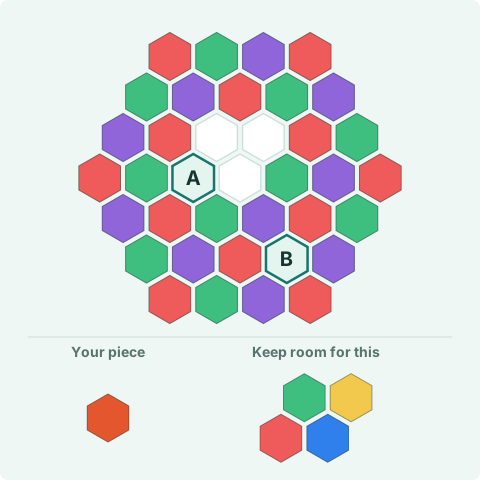
Where should the orange single go: A or B?
There are five empty cells. Four form the exact opening for the quad shown below. B is a separate empty cell. Place the orange single first, then leave a legal space for that fixed-orientation quad. There are no other orange tiles to merge with.
Reveal the move & why it works
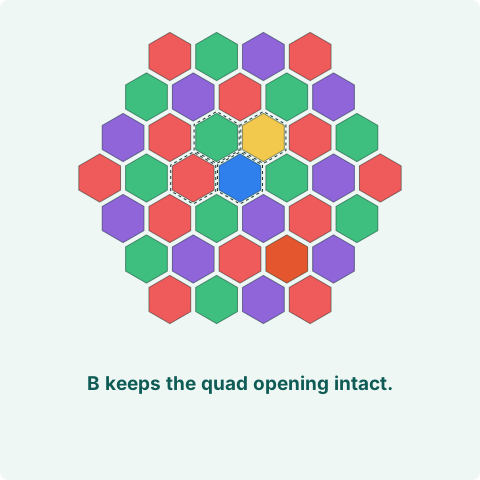
B keeps the four-cell opening intact.
Find the piece with the fewest homes
A single often fits in many places. A quad needs four empty cells in one particular arrangement. Checking the quad first can reveal a space worth protecting while you place smaller pieces.
You do not always have to place the largest piece first. Sometimes a smaller piece creates a Bloom and opens a better area. The useful question is: after this move, where can the awkward piece go?
Four spaces can still be the wrong shape
Hexzzle pieces keep the orientation you see in the tray. A straight opening will not necessarily accept a bent piece, even when both contain four cells. Separated single-cell gaps do not combine into one large opening.
In the puzzle above, both A and B are legal for the single. Neither immediately merges or Blooms. The difference is entirely in the space left for the next piece.
Look beyond the merge animation
If your first move gathers matching colors, some cells will reopen. Plan using that final shape, including the one cell where a below-6 stack remains. A stack can free several cells and still occupy the one corner your quad needs.
The preview helps you check a placement, but it does not reserve space for the rest of your tray. Take a moment to look at those other pieces before committing.
Try it in your next round
When a quad arrives, find one legal home for it. While considering another piece, check that the home survives or that a different one opens. A small piece used carefully is a planning tool, not just an easy move.